Smello for HTTP Requests

Good news, everyone. I invented a smell-o-scope.
Smello is a developer tool that captures outgoing HTTP requests from your Python code and displays them in a local web dashboard. It’s like Mailpit but for HTTP requests.
The magic looks like this:
# Set the server URL in your environment
# export SMELLO_URL=http://localhost:5110

# Then, add two lines to your code
import smello
smello.init()

# All outgoing HTTP requests are now captured
# Browse them at http://localhost:5110
The name is a reference to Professor Farnsworth’s Smell-O-Scope from Futurama, the best show ever. Like the original Smell-o-Scope, Smello sniffs out what your code sends to distant, probably intergalactic, APIs.
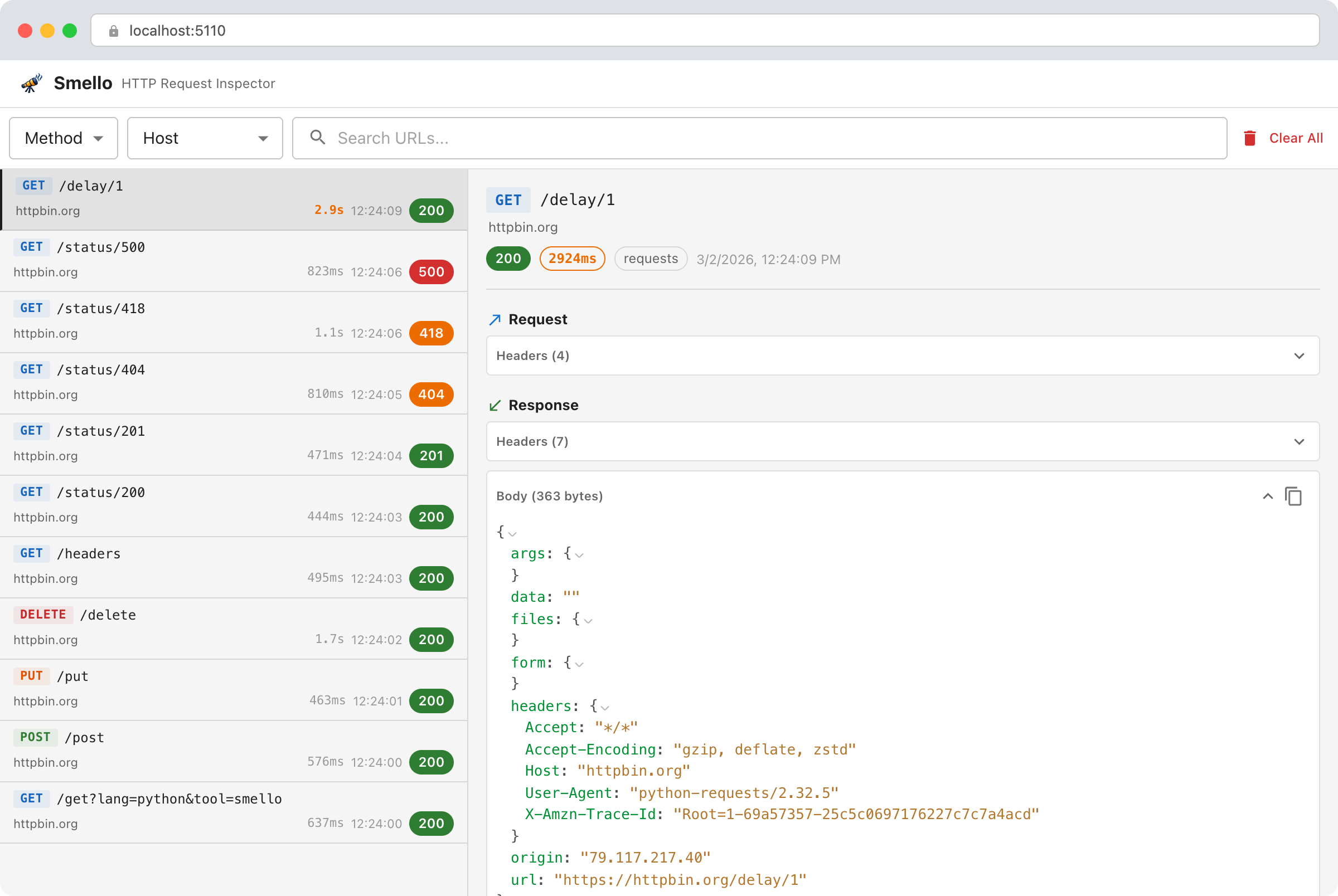
The Smello dashboard. Captured requests on the left, details on the right.
The problem
I work with external integrations a lot. Some of these APIs have great documentation, but the majority don’t. This is especially painful for those enterprise “contact us for pricing” services. With some exceptions, their API documentation is awful, clearly made as an afterthought. Usually, they send you something like a large outdated PDF, incomplete and poorly formatted, available by request. In this situation, the most reliable way to learn these APIs is to call them and look at what comes back.
Layers of abstraction make this worse. When you call a high-level SDK method, you often can’t see what’s actually being sent over the wire. You trust the SDK until something breaks, and when it does, you need to see the raw request.
Reflecting on the problem, I realized I had something similar years ago with email formatting and delivery. Outgoing emails are opaque and hard to debug. At some point, I discovered Mailpit, a local tool that captures all outgoing emails and lets you browse them in a clean local UI.
So I wanted to build a Mailpit for HTTP requests.
What I tried before
Postman and similar tools
Postman and friends are great for exploring APIs. You manually craft requests, send them, inspect responses. But it becomes less useful when you’re implementing or debugging the integration in your own app. Postman shows you what a request returns when you construct it by hand. It doesn’t show you what your code actually sends. When the bug is in how your code builds the request, Postman can’t help.
By the way, for all new projects I use Bruno instead of Postman, and I like it much better.
Proxy tools
mitmproxy, Charles Proxy, Proxyman, HTTP Toolkit. These are network interception tools that sit between your app and the internet to capture everything.
I tried a few of them but didn’t like how intrusive they are. For HTTPS traffic (which is all traffic now), you’re asking your system to trust a custom certificate authority. It works, but it feels like too much of an ask for “I just want to see what my code sends to the Stripe API.”
Print debugging
I use print debugging a lot, and it helps to some extent, but it can only get you so far.
Nested JSON is unreadable in a terminal. Manual testing means clicking through many steps, and the output is a wall of text you have to scroll through.
At some point, I wrote my own middleware that used the rich library to pretty-print requests and responses to the console or temporary files, controlled by debug flags. Honestly, I almost never used it. It was always confusing: too much output, no way to search or filter, and you had to decide upfront how to format and store things. Smello grew out of those ideas.
Specialized tracking tools
For LLM-based requests, you can use tools like LangSmith. It’s quite cool actually. It captures a lot of detail, but it only handles one specific type of request. I wanted something that works with any API.
How Smello works
You start a local server and add two lines to your Python code. That’s it.
The server runs in Docker or installs via pip:
docker run -p 5110:5110 ghcr.io/smelloscope/smello
Smello works by monkey-patching requests, httpx, and grpc at the library level. When your app makes an HTTP request, Smello captures the request and response data and sends it to the local server in a background thread. Your code doesn’t change beyond the init() call, and the patching doesn’t slow your requests down.
For every request, Smello captures the method, URL, headers, body, response status, response headers, response body, and duration. It redacts sensitive headers like Authorization and X-Api-Key by default.
The gRPC support turned out to be important for my own work. Page Analytics, a Chrome extension I built for Google Analytics and Search Console, uses the Google Cloud Python libraries under the hood. Those libraries use gRPC. With Smello’s gRPC patching, all those calls show up in the dashboard too.
A few design decisions are worth mentioning.
The server URL is the activation signal. If you call
smello.init()without aserver_url(and without theSMELLO_URLenvironment variable), nothing happens. No monkey-patching, no background threads, no side effects. This makes it safe to leave theinit()call in your code and control activation through environment variables.Everything is local. No data leaves your machine. No accounts, no registration, no cloud service. The server stores captured requests in SQLite.
The unexpected bonus: AI-powered debugging
One thing I discovered after building Smello is that you don’t have to examine the captured requests yourself. Because it exposes a JSON API, you can point a coding agent at it.
I created an agent skill for Claude Code and other AI coding tools that queries the Smello API to inspect captured traffic. The workflow looks like this: you tell the agent, “I have this problem, please reproduce it and use the HTTP debugger to understand the root cause.” The agent runs your code, examines the actual requests and responses through the Smello API, compares them to the API documentation, and tells you what’s wrong.
npx skills add smelloscope/smello
This turns debugging from “stare at JSON and figure it out” to “ask the agent to figure it out.” This changed how I approach integration bugs.
Try it
Smello is open source and MIT licensed. If you work with external APIs in Python and want a simple way to see what your code sends, give it a try.
pip install smello smello-server
The README has the full setup instructions.